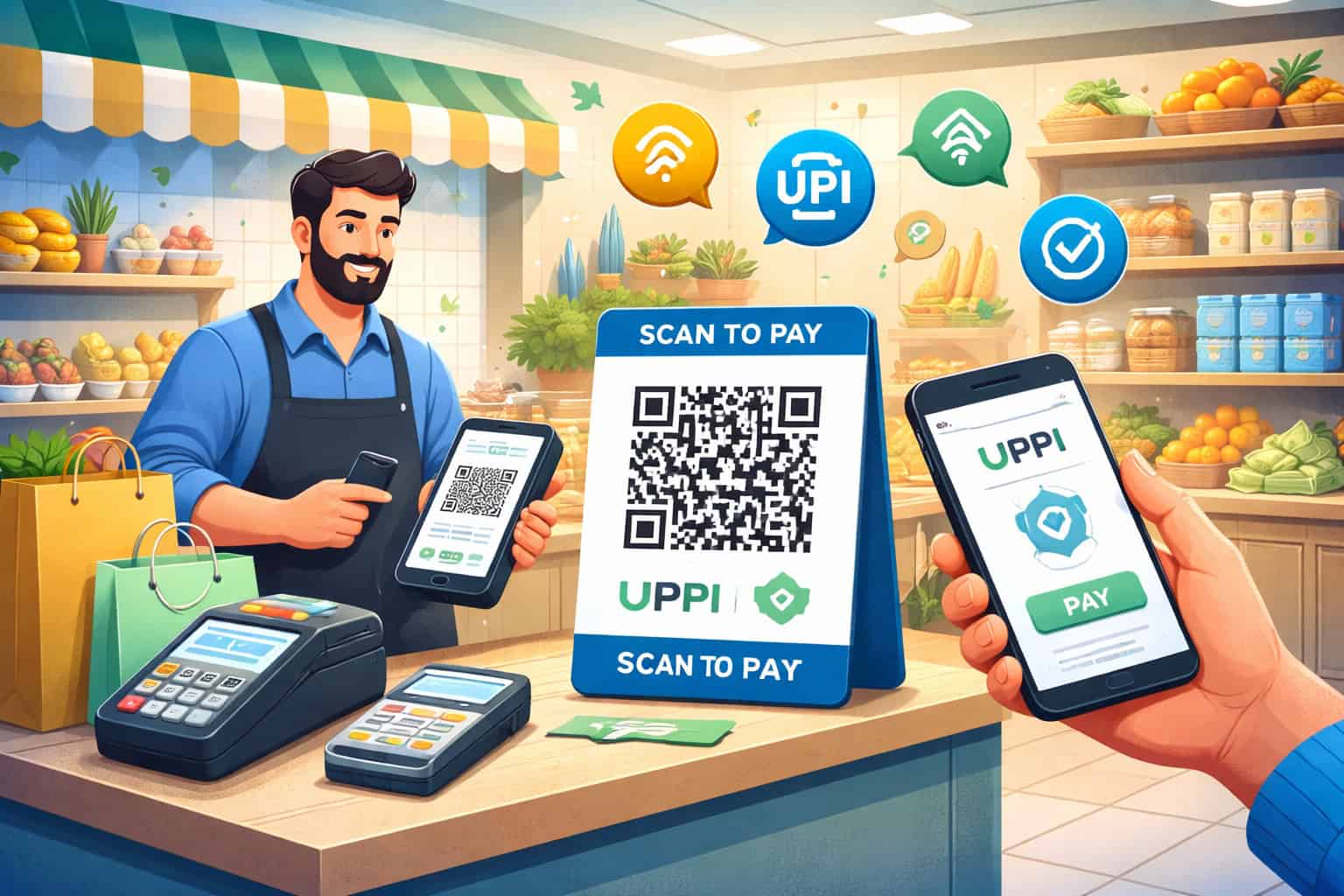
How to Accept UPI and QR Code Payments Instantly in Your Shop
Customers no longer want to wait while a cashier counts change, looks for smaller notes, or checks whether a card machine is working. They want a fast, smooth checkout experience that feels effortless. For many shop owners, that is exactly why learning how to Accept UPI and QR Code Payments has become so important.
The good news is that getting started is much easier than many merchants assume. You do not need a complicated payment setup, a large budget, or technical expertise to begin taking digital payments.
In many cases, a merchant account, a payment app for merchants, and a clearly displayed QR code are enough to start collecting money quickly and efficiently.
This matters because modern buying habits are changing. People often walk into a grocery store, café, pharmacy, clinic, service counter, or retail outlet expecting quick scan-and-pay convenience.
When a shop can accept UPI QR Code Payments without delay, it reduces checkout friction, supports contactless payments, and makes daily payment collection more organized.
For small business owners, the value goes beyond customer convenience. A strong UPI Payment System for Businesses can improve cash flow visibility, reduce cash handling, simplify merchant payment tracking, and make low-cost payment acceptance possible even for small-ticket sales.
Whether you run a busy counter or a neighborhood store, instant payment collection can save time and reduce errors.
This guide explains everything in a practical, step-by-step way. You will learn how the payment flow works, how to Accept UPI Payments in Shop, how to create and place a merchant QR code correctly, how to avoid common mistakes, and how to manage real-time payment confirmation with confidence.
By the end, you will have a clear path to offering fast, reliable, in-store digital payments with minimal friction.
What It Means to Accept UPI and QR Code Payments in a Shop
When you Accept UPI and QR Code Payments, you allow customers to pay by scanning a payment QR instead of handing over cash or swiping a card. The customer opens a payment app on their phone, scans the merchant QR code, enters or verifies the amount, approves the payment, and the money is transferred digitally.
For the merchant, it creates a simple and efficient form of mobile payment acceptance at the counter.
This setup is especially useful because it removes the need for cash exchange in many situations. A customer can pay for groceries, medicines, snacks, accessories, consultations, repairs, or services using a quick scan-and-pay system.
The merchant receives payment information through the app or merchant dashboard, often with real-time payment confirmation. That makes day-to-day shop payment methods more flexible and customer-friendly.
Unlike complicated payment tools that feel difficult to install or expensive to maintain, QR code checkout is often a low-friction option for small businesses.
A merchant QR code can usually be displayed on a countertop stand, printed sign, billing desk, menu board, product shelf, or service counter. That makes QR Code Payment for Shops accessible even for merchants with limited space or basic infrastructure.
It also supports changing customer expectations. Many buyers now prefer contactless payments because they are fast and convenient.
When a shop offers digital payments for shops through QR-based checkout, it signals that the business is current, practical, and easy to buy from. For repeat customers, that convenience often becomes a reason to return.
Another important point is that business payment acceptance through QR codes is not only for large retailers. Small shops, independent merchants, local clinics, food counters, cafés, salon desks, repair centers, and service stores can all benefit.
In fact, for many merchants, QR code payments are one of the easiest ways to modernize without adding heavy overhead.
How UPI and QR payments work in simple terms
The basic process is straightforward. A merchant signs up with a provider that offers a business payment acceptance solution. After approval, the merchant receives a QR code linked to the business payment account. The code can be static or dynamic depending on the setup and payment provider.
When a customer is ready to pay, they scan the code using a payment app. In some cases, the customer enters the amount manually. In other cases, the amount is pre-filled through a billing or dynamic QR process. The customer confirms the payment in the app, and the transaction moves through the payment network.
On the merchant side, a notification usually appears through the merchant app, soundbox, dashboard, SMS, or device alert. This is where real-time payment confirmation becomes so important.
Staff can verify whether the payment has truly arrived instead of relying only on a customer’s screenshot or verbal claim. That simple verification step helps avoid confusion and payment disputes.
The whole experience is designed to make instant payment collection easier for both sides. The customer gets speed and convenience. The merchant gets a digital record, less cash handling, and a faster checkout flow.
Why this payment method is so popular with small businesses
Small businesses often need solutions that are affordable, quick to adopt, and easy to manage. That is exactly why many merchants choose to Accept QR Code Payments Instantly instead of investing first in more complex systems. A QR payment setup often needs fewer devices, less staff training, and lower operating effort.
It is also versatile. A small grocery shop can keep a QR card near the billing counter. A café can place one at the register and another on tables. A clinic can display it at reception. A service store can keep it next to the invoice desk. This flexibility makes it a practical option for different business types.
Another reason it is widely adopted is that it supports low-ticket purchases well. Customers buying everyday items often want a fast and simple payment experience. They may not want to search for cash or wait for change. A quick scan reduces friction and keeps lines moving.
For merchants, the benefit goes beyond speed. A proper UPI Payment System for Businesses can improve transaction visibility, reduce manual recordkeeping, and make reconciliation easier at the end of the day.
Even when the shop is busy, digital payment records can help owners understand how much came in, when it came in, and which sales were completed successfully.
Why Instant Digital Payments Matter for Modern Shops

Today’s retail environment rewards convenience. Customers make fast decisions about where to shop, and payment experience plays a major role in that choice.
When a store can accept UPI and QR Code Payments quickly and reliably, the checkout process feels easier, more modern, and more trustworthy. That matters whether the business sells groceries, beverages, medicines, snacks, clothing, accessories, or services.
One major advantage is speed. A customer scans, confirms, and completes payment in moments. The cashier does not need to count notes, search for change, or handle cash-related delays.
That can make a noticeable difference during rush hours, especially in businesses with high foot traffic or low-ticket purchases. Even a few seconds saved per transaction adds up across a full day.
Another advantage is customer comfort. Many buyers already prefer mobile payment acceptance because it feels easier than carrying cash. It also supports contactless payments, which many customers now see as a basic convenience rather than a premium option.
If a shop does not offer digital payment adoption, some customers may leave or reduce spending because the payment process feels inconvenient.
For merchants, instant payment collection improves daily operations. Cash handling comes with challenges such as change shortages, counting errors, end-of-day balancing, and risk of misplaced funds.
QR-based payment collection reduces reliance on physical cash and creates a digital trail of transactions. That makes merchant payment tracking more efficient and helps businesses stay organized.
Just as important, digital payment options can improve trust. When customers see professional QR code checkout options displayed clearly, it gives the impression that the business is prepared, structured, and easy to transact with. That improves the overall shopping experience and can support repeat business over time.
Better checkout speed and customer convenience
Checkout speed influences how customers feel about a store. Even if your products are priced well and your service is friendly, a slow payment process can create frustration. When you Accept UPI Payments in Shop, you remove many of the delays that happen with cash transactions.
Think about a grocery counter during peak evening hours. Customers may be buying only a few quick items. They want to pay and leave.
If they need to wait for change or for someone to verify a card machine issue, the process becomes slower than necessary. A scan-and-pay system helps move the line faster while keeping the payment process simple.
This speed matters even more in businesses where lines form often. Cafés, snack counters, pharmacies, fruit shops, clinics, and local convenience stores can benefit greatly from a smooth digital payment option.
The ability to Accept QR Code Payments Instantly can reduce bottlenecks and make service feel more efficient without adding pressure on staff.
Customer payment convenience also affects basket size. When payment is easy, customers may feel more comfortable adding one or two extra items. A smooth payment experience removes hesitation.
In contrast, when the payment process feels awkward or slow, customers may rush their purchase or abandon it altogether.
Why digital payments help merchants operate more efficiently
Efficiency is not just about speed at the counter. It is also about how easy it is to manage the business after the sale. A proper QR code payment setup makes it easier to review transactions, verify collections, and reduce dependence on manual cash counting.
With cash, shop owners often deal with common issues such as missing change, counting mistakes, or uncertainty about whether the register balance matches actual sales. Digital records reduce these headaches.
When payments are tracked electronically, merchants can review amounts, timestamps, and transaction references more easily than sorting through loose notes and handwritten entries.
This can also improve staff accountability. If employees know that payment confirmations must be verified through the merchant app or system, it reduces confusion and limits guesswork. Owners can compare billed sales with received payments more clearly, which helps keep records organized.
Low-cost payment acceptance is another reason merchants choose this route. For many small businesses, QR-based digital payments can offer a practical entry point into modern payment systems without a heavy equipment burden.
Instead of waiting until the business is large enough for a more advanced setup, the shop can start improving payment collection immediately.
As digital payment adoption grows, customers increasingly expect businesses to support in-store digital payments. Merchants who adapt early can create a smoother experience, build customer trust, and keep daily collections more visible and manageable.
How Accept UPI QR Code Payments Works from Setup to Settlement
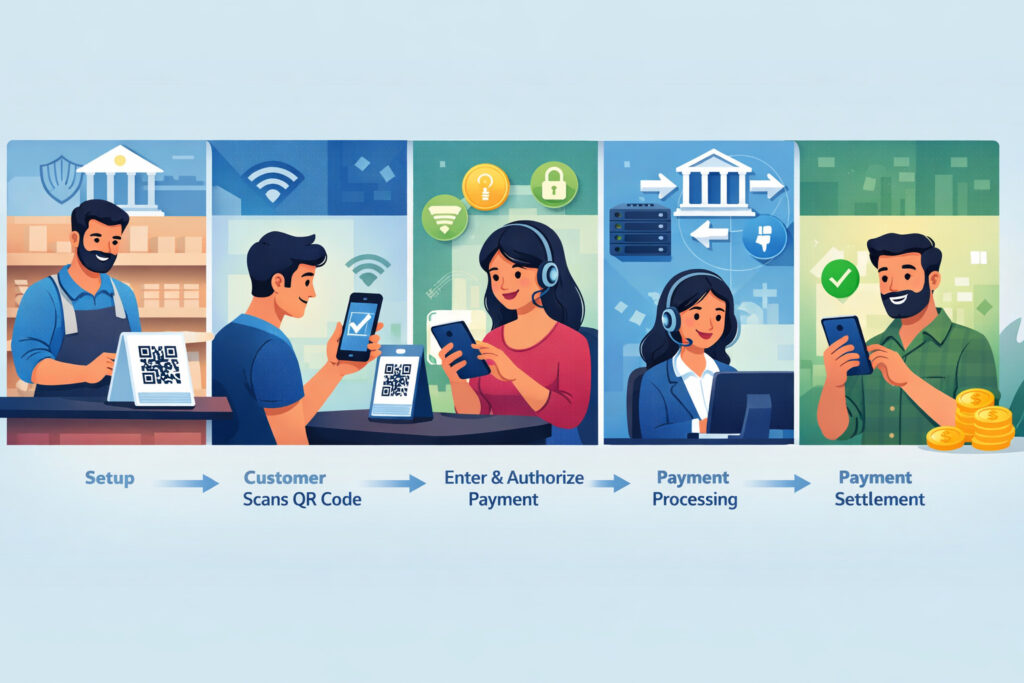
For many shop owners, the idea of digital payments sounds easy in theory but unclear in practice. They understand that customers scan a code and pay, but they may not know what happens behind the scenes.
Understanding the full process helps merchants feel more confident when they begin to Accept UPI and QR Code Payments in their store.
The system usually starts with merchant onboarding. A provider helps create a business payment acceptance account. Once approved, the shop receives a merchant QR code that is linked to the business. This code becomes the main tool for payment collection at the counter, desk, or service point.
When a customer makes a purchase, they scan the code using a supported payment app. Depending on the setup, the customer may enter the payment amount manually or see it already filled in through a dynamic QR flow.
After they approve the payment, the transaction is processed through the digital payments network and routed to the merchant’s business payment account.
The merchant then receives confirmation through one or more channels. This could include a mobile notification, a dashboard update, an SMS, or an audio alert from a payment device.
Settlement timing depends on the provider and the account structure, but the key operational point for merchants is knowing how to verify that a payment is actually successful before closing the transaction.
This is why a solid UPI Payment System for Businesses is more than just a QR sticker. It includes onboarding, payment flow, transaction confirmation, settlement visibility, and record access. When merchants understand these parts clearly, they are much less likely to make mistakes or face confusion at the counter.
Merchant onboarding, QR creation, and payment flow
The first step is choosing a provider that supports business accounts and merchant QR code setup. During onboarding, the merchant typically shares business details and completes basic verification. Once approved, the provider generates a QR code linked to that merchant account.
The QR may be static or dynamic. A static QR remains the same for all payments, and the customer enters the amount during checkout. A dynamic QR is generated with a specific payment amount already attached.
Both methods have their place. Static QR is easy and flexible for many small businesses, while dynamic QR can reduce amount-entry mistakes in busier or more structured environments.
After setup, the merchant places the QR where customers can easily see and scan it. At checkout, the customer opens a payment app, scans the code, checks the merchant name, enters or confirms the amount, and authorizes the payment. The process is quick, but staff should still remain attentive to confirmation steps.
One of the biggest advantages of this flow is minimal friction. There is no need to pass around change, no need to insert cards, and no long waiting period for many everyday sales. For shops that handle regular low-value purchases, this can make the buying process feel smoother and more modern.
The merchant’s role is to make sure the code is visible, the payment process is clearly guided, and the confirmation is checked before handing over goods or closing the transaction.
Merchant notifications, payment confirmation, and settlement basics
The most important operational step after a customer pays is verification. A merchant should never assume a payment is complete simply because the customer says it is.
The payment must be confirmed through the merchant side of the system. This could happen through the merchant app, dashboard, SMS alert, or another authorized confirmation method.
Real-time payment confirmation helps prevent common disputes. For example, a customer may accidentally show a pending screen instead of a successful payment. In other cases, network delays may make a payment appear incomplete for a few moments. Staff should know how to distinguish between a payment that is successful, pending, or failed.
Settlement refers to how the money is credited and reflected in the merchant’s payment account or linked bank account. The exact timing may vary by provider, but the merchant should understand what to expect.
Some providers show immediate transaction confirmation while settlement and final account credit visibility may follow the provider’s processing cycle.
This is why payment tracking matters. Merchants should review their transaction history regularly, especially during the first few weeks after setup. Doing this helps them understand how the system works in real-world conditions and gives them confidence in handling customer questions.
Step-by-Step Guide to Accept UPI Payments in Shop Without Hassle
Many merchants delay digital payment adoption because they assume setup will be complicated. In reality, the path to Accept UPI Payments in Shop is often much simpler than expected when broken into clear steps. The key is to approach the process with a practical mindset and focus on getting the basics right from day one.
You do not need to launch with a perfect or advanced system. You need a dependable provider, a business payment account, a properly placed QR code, and a routine for checking successful payments. Once those basics are in place, you can improve your payment workflow over time.
This step-by-step process works for both new and established businesses. A new merchant can use it to build a digital payment foundation from scratch. An existing shop can use it to replace a messy personal-payment setup with a more organized merchant payment flow.
The goal is not just to turn on digital payments. The goal is to make the payment experience smooth, professional, secure, and easy for both customers and staff. That is what truly helps a shop Accept UPI QR Code Payments with minimal friction.
Step 1 to Step 4: Choose a provider, set up the merchant account, get the QR, and test it
Start by choosing a payment provider designed for business use. Look for one that supports merchant onboarding, transaction tracking, easy QR code setup, clear notifications, and accessible support. Avoid using a personal account as a substitute for business payment acceptance because it can create recordkeeping and reconciliation problems later.
Once you choose a provider, complete the onboarding process carefully. Use your business details accurately and make sure the final merchant name appears correctly. This matters because customers will often check the displayed merchant name before completing a payment. A mismatch can create hesitation or failed transactions.
After approval, get your merchant QR code. Some businesses start with a printed QR stand, while others use a digital display or integrated checkout screen. What matters most is that the code is linked correctly and works consistently.
Before going live, test the QR yourself with a small transaction to confirm that scanning, payment flow, and merchant notification all work as expected.
Finally, decide where the QR should be placed. Put it at eye level where customers naturally look during checkout. A QR hidden behind products, placed too low, or printed poorly will reduce usage and create confusion. Clarity is part of successful mobile payment acceptance.
Step 5 to Step 8: Train staff, verify payments, track records, and keep a backup option
After setup, train everyone who handles sales. Staff should know how the customer payment flow works, how to guide a first-time user, and how to verify payment success. This step is often ignored, but it is essential. Even a good payment system can fail in practice if the team is unsure how to use it.
Create a standard rule for payment verification. Do not rely only on customer screenshots. Staff should always check the merchant-side notification or transaction record. This reduces the risk of handing over goods before the payment is actually received. It is one of the most important habits for secure digital payment collection.
Next, build a simple recordkeeping process. Even if the provider offers good merchant payment tracking, shop owners should still review transaction history daily.
That helps catch mismatches, identify duplicate payments, and improve reconciliation. Businesses with multiple counters or staff members especially benefit from having a consistent end-of-day review routine.
Also keep a backup payment option available. Sometimes a customer’s app may fail, the phone battery may be low, or a network issue may delay confirmation. Offering another payment method avoids unnecessary friction and protects the sale.
Benefits of QR Code Payment for Shops Beyond Convenience

Convenience is one of the biggest reasons merchants choose QR payments, but it is far from the only benefit. A good QR Code Payment for Shops setup can improve how the business operates throughout the day.
From reducing cash handling to simplifying recordkeeping, the advantages can affect both the customer experience and back-end management.
One of the clearest benefits is lower cash dependency. Cash is familiar, but it comes with practical challenges. It must be counted, stored, balanced, and protected. There can be shortages, mistakes, and disputes over change.
By contrast, digital payment collection creates cleaner records and reduces how much physical cash a business must manage every day.
Another benefit is better transaction visibility. When a merchant can see payment history through a dashboard or app, it becomes easier to review collections, match sales, and understand patterns. This is valuable for all business types, but especially helpful in stores with multiple employees or multiple daily payment sources.
A third advantage is professionalism. Customers often feel more confident when they see an organized QR code checkout process. It shows that the business has adapted to modern shop payment methods and values customer convenience. That can influence both trust and repeat visits.
Most importantly, these benefits are not limited to large retailers. Small businesses can gain just as much, and sometimes more, because efficient payment collection can have an immediate effect on operations.
For many merchants, the decision to Accept QR Code Payments Instantly becomes one of the simplest upgrades they make all year.
Reduced cash handling, faster collections, and easier reconciliation
Cash handling takes time and attention. Every note must be received, counted, stored, and balanced later. If the cashier gives the wrong change or the drawer balance looks incorrect at the end of the day, extra time is spent identifying what happened. QR payments reduce many of these common operational headaches.
Faster collections are another major benefit. When customers scan and pay quickly, the business can process more checkouts with less delay. This is especially useful in busy periods when line length affects customer mood and buying behavior. Faster payment flow supports better customer throughput without adding extra staff.
Easier reconciliation is where digital payment collection really shows long-term value. Merchants can compare transaction records with invoices or sales totals more clearly than when relying heavily on cash. The ability to see timestamps, amounts, and payment confirmations makes it easier to review what came in during the day.
This matters for owners who want better control over daily performance. Instead of guessing whether the drawer total looks right, they can check actual digital collections in a structured way. Over time, this improves confidence in merchant payment tracking and supports stronger financial discipline.
Better customer experience and support for repeat business
Customers remember friction. If the payment process feels slow, confusing, or limited, that experience can affect whether they return. On the other hand, when a business offers smooth in-store digital payments, it makes the buying journey feel easier from start to finish.
A customer buying a few items usually wants the payment step to be simple. They do not want to ask whether you accept digital payments. They do not want to search for exact change. They do not want to wait while staff try to troubleshoot an old device. A visible QR code and a quick confirmation process give them a more seamless experience.
Repeat customers especially value familiarity. Once they know your shop supports scan-and-pay convenience, they are likely to use it again without hesitation. This can increase customer satisfaction and improve how often they choose your business over another shop nearby.
There is also a subtle trust factor. A business that offers organized contactless payments often appears more efficient and customer-focused. That does not replace service quality or product value, but it supports both. When the final step of the purchase feels easy, the overall experience feels stronger.
How Different Types of Shops Can Use UPI and QR Payments Effectively
One of the biggest strengths of QR-based payments is flexibility. There is no single “ideal” business type for this payment model. A wide range of merchants can Accept UPI and QR Code Payments effectively as long as the setup matches the way customers buy in that business.
For some shops, the goal is speed. For others, it is reducing cash handling. In some businesses, payment collection happens at a counter. In others, it happens at a table, reception desk, or service area. The best setup depends on where the transaction happens and how customers move through the space.
A grocery store may need quick counter payments. A café may benefit from tabletop QR placement or a front register display. A clinic may want a reception-based payment workflow with clear confirmation before the patient leaves.
A service store may need staff to confirm payment after a repair invoice is explained. The point is not to copy another business exactly. The point is to shape QR payment acceptance around your own shop’s flow.
This is where practical thinking matters. The same technology can support different business styles when the QR placement, staff training, and payment verification process are tailored to real customer behavior.
Grocery shops, retail counters, and cafes
Grocery shops often process a high number of small purchases. Customers usually want speed more than anything else. For this reason, grocery stores can benefit greatly from a clearly visible payment QR placed near the cash register.
Since many customers already know how to scan and pay, the transaction can happen quickly with minimal cashier involvement.
Retail counters selling clothing, accessories, gifts, or electronics can use QR payments to create a cleaner checkout experience.
A well-placed QR stand near the billing desk allows staff to focus on packing and customer service while the buyer completes the payment on their phone. If the store experiences busy weekend traffic, this can reduce pressure on the counter.
Cafés and snack counters may need a slightly different setup. If payment usually happens before order preparation, a front-register QR works well.
If customers are seated, tabletop QR options may also support faster service, though staff still need a clear process for payment confirmation. In all these environments, visible QR placement and quick verification are essential.
Because these businesses often deal with frequent low-ticket purchases, Accept QR Code Payments Instantly can help reduce waiting time and improve flow during busy hours.
Clinics, service stores, salons, and local businesses
Clinics often handle payments at a reception desk after consultation, testing, or basic services. A merchant QR code at reception can simplify the collection process and reduce cash handling.
Staff should verify payment success before issuing receipts or marking the visit complete. This creates a more organized and professional payment experience for patients.
Service stores such as mobile repair centers, tailoring shops, appliance service counters, and local repair desks can use QR payments effectively after explaining charges to the customer.
Since the amount may vary by service, staff should clearly state the total, guide the customer through payment if needed, and confirm success before releasing the item.
Salons and grooming businesses can also benefit because digital payments reduce change-related friction after services are completed. Many customers appreciate being able to pay quickly without slowing down the next appointment.
Other local businesses such as stationery shops, florists, bakeries, small wholesalers, and neighborhood vendors can use the same system with minimal setup. The biggest advantage is adaptability. Merchants can scale from one QR card and one counter to a more structured payment process as the business grows.
Common Problems Merchants Face and How to Handle Them
No payment system is perfect every single time. Even when you Accept UPI Payments in Shop with a reliable provider, there will be moments when customers face confusion, staff need to double-check status, or payments behave unexpectedly. The key is not avoiding every issue. The key is knowing how to respond calmly and consistently.
Common problems include failed transactions, delayed notifications, duplicate payments, wrong amount entries, and customers who are unsure how the scan-and-pay process works. These are manageable if the shop has a simple verification process and staff know what to do.
What creates bigger problems is inconsistency. If one employee accepts screenshots, another checks the merchant app, and a third just trusts the customer’s word, confusion becomes much more likely. A standard payment handling routine protects both the merchant and the customer.
The most effective way to manage problems is to prepare before they happen. That means training staff, checking notification tools, reviewing transaction history, and creating a response plan for mismatched or unclear payments. Merchants do not need advanced technical expertise for this. They just need clear habits.
Failed transactions, delayed confirmations, and duplicate payments
A failed transaction means the payment did not complete successfully. The customer may see an error, the payment may remain pending, or the merchant may receive no confirmation at all.
In this situation, goods should not be handed over until the merchant-side system confirms success. If the payment remains unclear, ask the customer to check their app status and try again only after the first attempt is fully reviewed.
Delayed confirmations can happen when network conditions or app performance slow down notification timing. This is why merchant-side verification matters so much. Staff should know how to refresh the merchant app, check transaction history, or wait briefly before assuming the payment failed. A calm process prevents confusion.
Duplicate payments usually happen when a customer retries too quickly or when both parties think the first transaction failed even though it later succeeds. If this happens, compare timestamps and transaction references carefully.
Keeping a daily transaction log helps spot these issues faster. If a customer paid twice, resolve it according to your provider’s process and internal recordkeeping rules.
The important point is to avoid rushed assumptions. Many payment disputes become bigger than necessary because the merchant or customer reacts before checking the full status properly.
Wrong amount entries and customer confusion at checkout
In static QR payment flows, the customer often enters the amount manually. This creates convenience, but it also introduces the possibility of mistakes.
A customer may type the wrong number, miss a digit, or accidentally pay less or more than the billed amount. Staff should therefore state the total clearly and confirm the amount before asking the customer to proceed.
If the wrong amount is paid, handle it politely and factually. Do not rely on memory alone. Check the merchant transaction record and compare it with the bill. If there is an underpayment, explain the difference and request the remaining amount. If there is an overpayment, resolve it through your business process with a proper record.
Customer confusion is common when someone is new to digital payments or using an unfamiliar app. Staff should be able to guide them through the basics: scan the code, verify the merchant name, enter the amount, and confirm payment.
That guidance should be helpful but never intrusive. Customers should always control the payment on their own device.
Security, Best Practices, and Mistakes to Avoid
A payment method is only as strong as the habits around it. To Accept UPI and QR Code Payments safely and smoothly, merchants need more than a printed QR sign. They need a basic security mindset, clear operational rules, and awareness of the mistakes that commonly create confusion or loss.
The good news is that strong QR payment security often comes down to simple discipline. Verify payments properly. Keep business and personal transactions separate. Review records daily. Place the QR where customers can scan it easily but where staff can still monitor the process. Small operational habits make a major difference.
Security also includes presentation. A damaged, poorly printed, or carelessly placed QR code can create scan issues or customer doubt. A clean and professional setup helps customers trust the payment process and reduces mistakes at checkout.
Perhaps the biggest mistake merchants make is treating digital payments as casual instead of operational. Once a shop begins taking regular digital payments, those collections become part of core business activity. That means they deserve the same level of care as cash, billing, inventory, and receipts.
Security habits that protect your business and customers
Start with a business-only account. Using personal payment channels for shop transactions creates confusion, weakens accounting accuracy, and makes merchant payment tracking harder. A dedicated merchant payment setup is one of the simplest ways to protect operational clarity.
Next, verify every transaction using the merchant-side source of truth. A customer screenshot is not enough. Staff should check the app, device alert, or dashboard that belongs to the business. This is one of the strongest protections against false confirmation and payment misunderstandings.
Keep your QR code secure and updated. Do not allow unofficial replacement stickers or handwritten edits near the payment area. If the QR code becomes damaged, replace it promptly. If your provider changes your merchant setup, use only the latest official version.
Also limit who can access transaction records and account controls. Staff may need to verify payments, but not everyone needs administrative access. Basic access discipline reduces accidental errors and keeps the payment process more organized.
Common mistakes that reduce payment success or create confusion
Poor QR placement is one of the most common mistakes. If customers cannot see the code easily, they hesitate or ask unnecessary questions. If the code is placed where lighting causes glare or where it gets folded, stained, or covered, scan quality suffers. Good placement matters more than many merchants realize.
Another frequent mistake is not verifying payment status before handing over goods. In busy moments, staff may rush. That is exactly when errors happen. Make confirmation a required final step for every transaction, no matter how routine the sale feels.
Some merchants also fail to track transactions consistently. They assume the provider stores everything, so they do not review daily payment history. This can delay the discovery of failed payments, duplicate collections, or record mismatches. Daily review is a smart habit, especially in the early months.
Not offering a backup payment option is another avoidable issue. Even if QR payments work well most of the time, occasional network or customer-side problems can happen. A backup option keeps the sale moving and prevents unnecessary frustration.
A Practical Daily Checklist to Manage UPI and QR Payments Smoothly
Once your setup is live, success depends on consistency. A simple daily routine helps merchants Accept UPI QR Code Payments with fewer errors, better tracking, and stronger customer confidence. The best checklist is not complicated. It is short, repeatable, and easy for staff to follow even during busy shifts.
A good routine begins before the shop opens. Check that the merchant QR code is visible, clean, and readable. Make sure the app, device, or notification method used for payment confirmation is active. If your business uses a phone or tablet to verify transactions, confirm that it is charged and connected.
During the day, the checklist should focus on payment accuracy. Staff should clearly state the amount, guide customers when needed, and verify every successful payment through the merchant system. For busy shops, consistency matters more than speed alone. A rushed process may save seconds but create avoidable disputes.
At closing time, review the day’s records. Compare the merchant transaction history with sales totals or invoices. Look for missing entries, duplicate payments, or unclear statuses. This habit helps keep records organized and strengthens reconciliation over time.
A checklist turns digital payment adoption from a casual feature into a reliable shop process. That is what makes payment acceptance feel smooth, professional, and scalable.
Opening and during-business checklist
Before opening, review the basic tools that support your payment process. This should take only a few minutes, but it sets the tone for the entire day. Make sure the QR stand is visible, stable, and positioned correctly. Check whether glare, dust, or physical damage could make scanning harder.
Confirm that your merchant app, soundbox, or notification method is working. If you use a phone for confirmations, make sure it is charged and not left in silent mode if alerts matter to your workflow. If multiple employees are on shift, remind them which device or dashboard is the official source for payment verification.
During business hours, follow a consistent payment flow:
- State the total clearly
- Ask the customer to scan the merchant QR code
- Remind them to verify the merchant name
- Confirm the amount entered or displayed
- Check the merchant-side success notification
- Complete the sale only after confirmation
These steps help reduce wrong amount entries, customer confusion, and unverified payment risks. They also help staff remain calm during busy periods because everyone follows the same routine.
Closing checklist and record review
At the end of the day, take a few minutes to review transaction records. Open the merchant app or dashboard and check the payment history for the day. Compare the number and value of transactions against your billing records or sales totals if available.
Look specifically for:
- Pending or unclear transactions
- Duplicate payment entries
- Payments received for the wrong amount
- Sales completed without a matching payment record
- Any unusual timing or amount patterns
If something looks off, investigate while the day’s activity is still fresh in memory. Waiting too long makes issues harder to resolve. A daily review routine strengthens merchant payment tracking and reduces the chance of unresolved discrepancies building up over time.
It is also helpful to note common customer questions or staff challenges. If the same confusion happens repeatedly, update your process. For example, you may need a larger QR display, a better sign, or a stronger staff script for payment guidance.
FAQ
Q.1: Is it difficult to accept UPI and QR code payments in a small shop?
Answer: No, the setup is usually much easier than many merchants expect. In most cases, you need a business payment provider, merchant onboarding, and a QR code linked to your business account. Once the QR is displayed and tested, staff only need to learn how to guide customers and verify successful payments properly.
Q.2: Can I accept UPI payments in a shop without expensive equipment?
Answer: Yes. Many merchants start with a simple QR code setup and a merchant app for confirmation. That makes it a low-cost payment acceptance option for small businesses. Some shops later add soundboxes or integrated billing tools, but basic QR payment collection can often begin without heavy hardware investment.
Q.3: What is the difference between a static QR and a dynamic QR?
Answer: A static QR stays the same for every transaction, and the customer usually enters the amount manually. A dynamic QR is generated for a specific payment amount, which reduces entry mistakes and can make checkout more structured. Small shops often begin with static QR, while busier or more system-driven businesses may prefer dynamic QR.
Q.4: How do I know whether a payment was successful?
Answer: Always verify the payment through the merchant-side confirmation source, such as your app, dashboard, SMS, or device alert. Do not rely only on the customer’s screenshot or statement. Real-time payment confirmation is one of the most important parts of secure business payment acceptance.
Q.5: What should I do if a customer says they paid but I did not get confirmation?
Answer: Check your merchant app or transaction history first. The payment may be pending, failed, or delayed. Ask the customer to review their payment status as well. Do not complete the sale until the merchant-side system clearly shows the payment as successful.
Q.6: Can QR code payment for shops work for low-ticket purchases?
Answer: Yes, it works very well for low-ticket purchases. In fact, many merchants use it to speed up everyday transactions where customers want quick scan-and-pay convenience. Grocery items, snacks, beverages, medicines, and small retail purchases are common examples.
Q.7: Should I use my personal account to accept shop payments?
Answer: It is better to use a dedicated business or merchant account. Mixing personal and business transactions makes accounting, reconciliation, and payment tracking harder. A separate merchant setup keeps records cleaner and helps the business operate more professionally.
Q.8: Where should I place the merchant QR code in my shop?
Answer: Place it where customers naturally look when they are ready to pay. That may be the billing counter, reception desk, service counter, table, or cashier area. Make sure the code is clearly visible, well lit, and easy to scan without awkward movement or glare.
Q.9: What are the biggest mistakes to avoid when accepting QR payments?
Answer: The most common mistakes include poor QR placement, not verifying payment status, using personal accounts for business payments, failing to track transactions, and not keeping a backup payment option. These issues are easy to reduce with better setup and staff training.
Q.10: Can established merchants benefit from accepting QR code payments instantly, or is it mainly for new shops?
Answer: Established merchants can benefit just as much, and sometimes more. If your business handles many daily transactions, digital payments can improve speed, reduce cash-related issues, and make recordkeeping easier.
Whether you are a new shop or a long-running business, a well-managed QR payment setup can strengthen the checkout experience.
Conclusion
Learning how to Accept UPI and QR Code Payments in your shop is no longer just a convenience upgrade. For many merchants, it is now a practical step toward faster collections, better customer service, and more organized daily operations.
The biggest advantage is that it does not have to be complicated. With the right provider, a proper merchant QR code, and a clear verification routine, even a small shop can start accepting instant digital payments smoothly.
The real value goes beyond giving customers another way to pay. A good UPI Payment System for Businesses reduces cash handling, supports contactless payments, improves merchant payment tracking, and helps create a quicker checkout experience.
For grocery stores, cafés, clinics, service counters, retail shops, and other local businesses, that can lead to stronger customer satisfaction and better payment control.
Success comes from getting the basics right. Use a business account, place the QR properly, train staff, verify payments carefully, and review records every day. Avoid the common mistakes that cause confusion, such as poor QR placement, using personal accounts, or skipping payment confirmation.
When done well, digital payment adoption feels simple for customers and manageable for merchants. That is exactly what modern shops need: low-friction, low-cost payment acceptance that supports real business growth.
If you want a faster, cleaner, and more customer-friendly checkout process, now is the right time to Accept UPI QR Code Payments and make them part of your everyday shop operations.